


Buy Enzyme (MLN) with USD, EUR and Other Fiat Currencies
Enzyme (MLN) is one of the more specialized Ethereum-based tokens in the market because it is tied to on-chain asset management rather than a generic payments or meme narrative.
For buyers who want to purchase MLN with USD, EUR, and other fiat currencies, the simplest route is usually a wallet with built-in fiat on-ramp support and Ethereum token compatibility. In many cases, MLN can be bought directly through supported wallet providers. In others, users buy a liquid base asset first and then swap into MLN.
This article was prepared by ilink, a FinTech and Web3 software developer with 13 years of experience and completed projects worldwide.
What Is Enzyme (MLN)?
Enzyme is a protocol focused on tokenized finance and decentralized asset management. On its official site, the project describes itself as infrastructure for creating and managing tokenized financial products. Instead of positioning MLN as a pure payments coin, Enzyme uses it as part of a broader financial toolkit for vaults, strategies, and protocol access.
The utility model behind MLN is one of the main reasons the token still attracts attention. Enzyme’s tokenomics documentation explains that users pay access fees in MLN, and those collected tokens are automatically burned. The protocol also gives a lower effective fee when users pay in MLN rather than relying on the more expensive default structure. That means the token has a clear role inside the protocol instead of existing only as a speculative trading instrument.
MLN also has one of the smaller circulating supplies among established Ethereum infrastructure tokens. Market data from CoinGecko, Yahoo Finance, and Coinbase places circulation at roughly 3.27 million tokens. Combined with an all-time high that was far above today’s market level, this reinforces the idea that MLN is a volatile altcoin with a real protocol use case behind it.
Where Can I Buy Enzyme (MLN) with Cash? 10 Best Crypto Wallets
1. Walletverse

Walletverse is a mobile, non-custodial crypto wallet built for buying, storing, sending, and swapping assets in one place. Based on the product details you shared, it supports more than 700 cryptocurrencies, multiple accounts, dApps, Apple Pay, Google Pay, credit and debit cards, and a wide list of fiat currencies. It is designed for both beginners and advanced users and emphasizes self-custody, passcode protection, and biometric authentication.
For MLN buyers, Walletverse is a practical option because it gives you an easy mobile flow for funding the wallet with fiat and then buying or swapping into Ethereum-based assets.
Pros
- Beginner-friendly mobile experience;
- Non-custodial with passcode and biometric security;
- Supports many fiat currencies and payment methods;
- Good for buying, swapping, and storing crypto in one app.
Cons
- Mobile-only format may not suit desktop-first users;
- Direct token availability can vary by provider and region.



2. MetaMask

MetaMask is one of the strongest choices for MLN because it has an official Enzyme buying flow and supports direct token selection on Ethereum. Its purchase flow also supports a broad range of payment methods depending on region, including cards, Apple Pay, Google Pay, PayPal, bank account, PIX, GCash, and local exchanges.
Pros
- Official MLN buy flow;
- Strong Ethereum and ERC-20 support;
- Excellent Web3 and DeFi compatibility.
Cons
- Less beginner-friendly than simpler wallets;
- Provider and network fees can add to the total cost.
3. Trust Wallet

Trust Wallet is a broad self-custody wallet used by many buyers who want one app for multiple assets, swaps, and dApps. It is a good fit for users who want MLN as part of a wider portfolio.
Pros
- Broad token support;
- Good mobile experience;
- Useful for swaps and general Web3 access.
Cons
- Fiat methods depend on region and providers;
- Not as directly tied to MLN as MetaMask.
4. TokenPocket
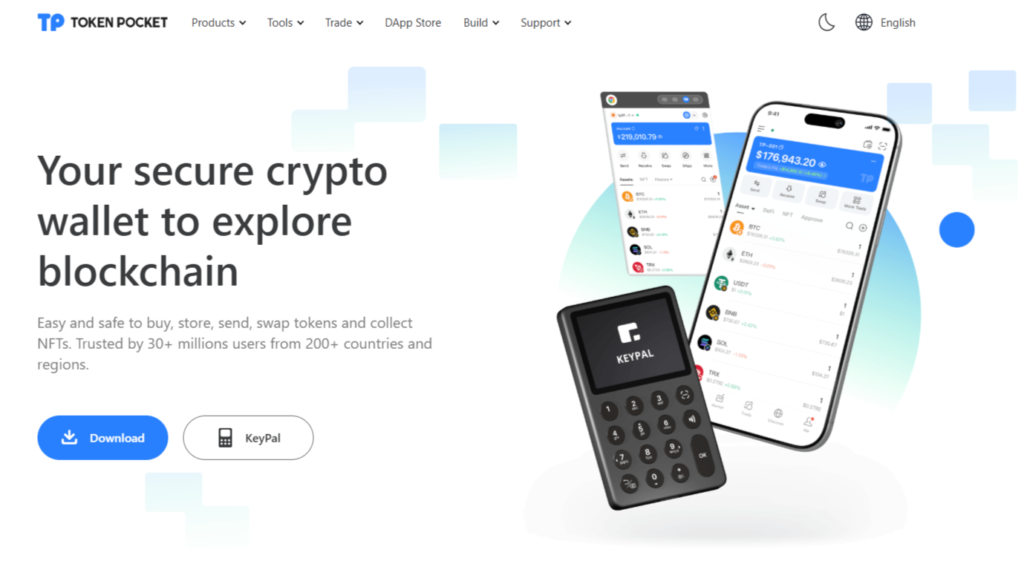
TokenPocket is better suited to users already comfortable with wallets, swaps, and on-chain tools. It is more practical for active Web3 users than for total beginners.
Pros
- Good for active Web3 usage;
- Built-in token tools and swaps;
- Useful for experienced on-chain users.
Cons
- Less intuitive for first-time wallet users;
- Better for intermediate and advanced users.
5. Zengo

Zengo uses an MPC-based security approach instead of a traditional seed phrase, which some users find easier to manage. It is a useful option for mobile-first buyers who want simplified recovery.
Pros
- Simpler recovery experience;
- Beginner-friendly security model;
- Good for mobile-first users.
Cons
- Less customizable than seed-based wallets;
- Advanced users may prefer more manual control.
6. Coinbase Wallet

Coinbase Wallet is useful for buyers who are already comfortable with Coinbase and want a simpler move into self-custody. Coinbase also maintains active MLN market pages, which makes it easier to track the asset before and after purchase.
Pros
- Familiar for Coinbase users;
- Good beginner-to-intermediate experience;
- Easy transition from centralized exchange habits to self-custody.
Cons
- Less flexible than DeFi-native wallets for advanced users;
- In-wallet buying experience varies by region.
7. Exodus

Exodus is a polished wallet available on desktop and mobile, known for its cleaner design and easier portfolio management. It suits buyers who want a less technical interface while still keeping control of their assets.
Pros
- Clean design;
- Good multi-device experience;
- Easy portfolio-style asset management.
Cons
- Less customizable for advanced DeFi use;
- Fiat provider pricing can vary.
8. Guarda

Guarda supports web, desktop, and mobile access, which makes it useful for buyers who want flexibility across devices while keeping self-custody. It is a practical choice if you want broad asset coverage.
Pros
- Multi-platform access;
- Broad asset support;
- Useful for users who want device flexibility.
Cons
- Less streamlined than some mobile-first wallets;
- Always verify current token support before purchase.
9. Atomic Wallet

Atomic Wallet is a non-custodial wallet with broad asset support and straightforward purchase flows through payment partners. It works well if your goal is simple purchase, storage, and occasional swaps.
Pros
- Easy purchase flow;
- Broad asset support;
- Non-custodial structure.
Cons
- Less advanced for Web3-heavy users;
- Fiat features depend on external partners.
10. SafePal

SafePal is a strong option for users who care more about security and may later want hardware-wallet support. It is especially useful for people planning to hold tokens longer rather than trade frequently.
Pros
- Strong security positioning;
- Hardware upgrade path available;
- Good for longer-term self-custody.
Cons
- More setup than beginner-first wallets;
- Less intuitive for casual users.
Buy MLN with Apple Pay
Apple Pay is one of the easiest ways to fund a crypto purchase on mobile, especially when the wallet supports direct token buying or a smooth buy-and-swap flow. MetaMask’s official Enzyme purchase guide explicitly includes Apple Pay among its supported options in eligible regions. That makes it possible to go from fiat to MLN without leaving the wallet environment.
For Walletverse users, the Apple Pay route is also practical because the wallet supports Apple Pay for crypto purchases and is designed around mobile self-custody. If a direct MLN quote is unavailable in your local market, you can still use Apple Pay to buy a supported base asset and then convert it into MLN.
Buy MLN with Google Pay
Google Pay follows the same logic. MetaMask’s official MLN guide lists Google Pay among the available purchase methods, alongside cards, bank accounts, PayPal, PIX, and GCash in supported regions. That makes it one of the simpler fiat-to-MLN routes for mobile users.
Walletverse is also well suited to this flow because it supports Google Pay and lets users manage purchases, swaps, and storage in one mobile app.
How to Buy The Enzyme (MLN) with Fiat
1. Choose a Wallet
Pick a wallet that supports Ethereum tokens and fiat on-ramp purchases, such as Walletverse, MetaMask, Coinbase Wallet, or another option from the list above.
2. Set Up and Secure the Wallet
Create the wallet, back up the recovery method if needed, and enable passcode or biometric security. In self-custody, protecting your access is essential.
3. Buy MLN or a Supported Base Asset with Fiat
Use USD, EUR, GBP, CAD, AUD, INR, JPY, KZT, or another supported fiat currency to buy MLN directly where available. MetaMask’s official guide allows direct MLN purchases on Ethereum and supports multiple payment methods depending on the region.
4. Swap if Needed
If direct MLN purchase is not available through your local provider, buy a supported base asset first and then swap into MLN. Since MLN is an ERC-20 token, this is usually a straightforward Ethereum-based route.
5. Hold or Transfer MLN
After purchase, you can keep MLN in your wallet, move it to another self-custody wallet, or use it inside the Enzyme ecosystem. The token’s fee and burn model means it also has direct utility for active protocol users.
A useful note: your real buying cost is not only the MLN price. It can also include fiat on-ramp fees, spread, and Ethereum network costs.
FAQ
Most frequent questions and answers
MLN has a stronger utility story than many altcoins because Enzyme uses it for protocol access, fee payment, and burn mechanics. Enzyme’s documentation says users pay fees in MLN and that collected tokens are burned automatically. At the same time, MLN remains a volatile altcoin, so it is usually better suited to buyers who are comfortable with risk than to users looking only for lower-volatility core holdings.
The easiest route is to use a wallet with a fiat on-ramp, choose USD, and buy MLN directly where supported (like Walletverse).
You can use Walletverse, MetaMask, Coinbase Wallet, Trust Wallet, Exodus, Guarda, Atomic Wallet, SafePal, TokenPocket, or Zengo. MetaMask stands out because its official MLN pages explicitly say users can buy, sell, manage, and trade MLN there.
You can buy MLN through wallets and platforms that support Ethereum token purchases, for example Walletverse crypto wallet.
Yes. Walletverse is built for buying, storing, sending, and swapping many crypto assets in a self-custodial mobile environment, which makes it practical for managing MLN after purchase.


