



Bitcoin (BTC) Wallet
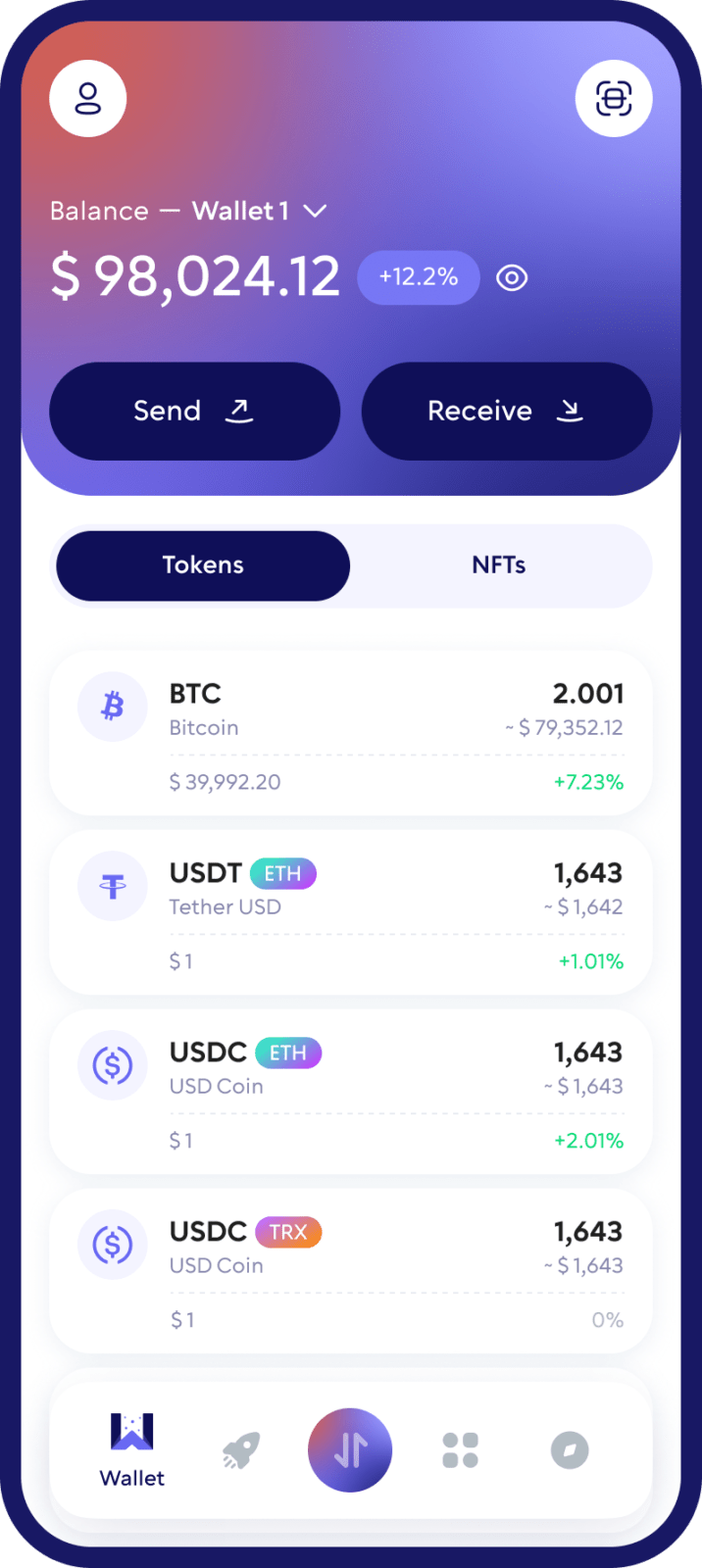
Self-custody Bitcoin on your phone. Your keys stay with you, so nobody — not an exchange, not Walletverse — can freeze or move your BTC. Buy it, send it, swap it and hold it in one free app for iOS and Android.
Featured in:


What Is Bitcoin?
Bitcoin (BTC) is a digital currency that runs on a worldwide network of computers rather than inside a bank. It was introduced in 2009 by the pseudonymous Satoshi Nakamoto, whose white paper describes it as “a purely peer-to-peer version of electronic cash” that lets online payments be sent without going through a financial institution (Bitcoin white paper).
How to set up your Bitcoin wallet
Self-custody, not a promise
Walletverse is a non-custodial wallet. Your private keys are encrypted on your device and never leave it, so the Walletverse team cannot access, freeze or move your Bitcoin.
Buy BTC without an exchange account
Buy Bitcoin with Visa, Mastercard or local payment methods through MoonPay, Simplex, Banxa, Transak and Wert, and with Apple Pay or Google Pay where available. Pay in USD, EUR, and other currencies.
Swap BTC in the app
Swap Bitcoin for other assets through a built-in DEX and CEX aggregator that connects 100+ exchanges with more than 10,000 trading pairs. You can also move into a USD stablecoin such as USDT or USDC when you want to step out of Bitcoin’s volatility.
One app for 700+ assets
Hold Bitcoin alongside Ethereum, Tether, USD Coin, XRP, BNB, Solana, TRON, Dogecoin and 700+ other cryptocurrencies and tokens. Create multiple accounts and addresses in one app.
AML checks before you transact
Built-in AML checks (powered by Crystal) let you check the risk level of an address or a transfer before you deal with it.
A say in what gets built
Community voting lets users decide which features Walletverse adds next.
How to Set Up Your Bitcoin Wallet
- Download the app. Install Walletverse from the App Store or Google Play and create your wallet.
- Lock it down. Follow the backup instructions and turn on the passcode and biometric lock. Only you can open the wallet and approve a payment.
- Get your first BTC. Open Bitcoin, tap Receive and share your address or QR code — or buy BTC in the app.
How to Send and Receive Bitcoin
To receive BTC: open Bitcoin in Walletverse, tap Receive and share your address or QR code. A Bitcoin address is safe to share — it’s what someone needs to pay you.
To send BTC: open Bitcoin, tap Send, paste the recipient’s address, enter the amount, review the network fee and confirm.
Before you send, keep in mind:
- Bitcoin payments are irreversible. A transaction can’t be reversed — only refunded by the person who received it.
- Confirmation takes time. New Bitcoin blocks are added roughly every 10 minutes, so a payment isn’t instant.
- Transactions are public. All Bitcoin transactions are recorded on a public ledger and can be traced.
Check the address before every payment and send a small test amount when you pay a new address. If you’re moving BTC from an exchange, see our guide on how to transfer crypto from an exchange to a wallet.
Buy and Swap Bitcoin
- Buy BTC with a credit or debit card, Apple Pay or Google Pay through partner providers. Rates and fees depend on the provider, payment method and region.
- Swap BTC into Ethereum, Tether, USD Coin, XRP and other supported assets — or swap other coins into BTC — through the built-in aggregator, without an exchange account.
Bitcoin on a Hardware Wallet
For large long-term holdings, many people use a hardware (cold) wallet that keeps private keys on a separate device:
- Ledger and Trezor hardware wallets support Bitcoin; Trezor devices are managed in the Trezor Suite app (Trezor), Ledger devices in the Ledger Wallet app.
Walletverse is a mobile hot wallet and doesn’t connect to hardware wallets yet. A common setup is a hardware wallet for long-term savings plus Walletverse for everyday BTC payments, buying and swaps.
| Walletverse (mobile hot wallet) | Hardware wallet | |
|---|---|---|
| Cost | Free | You buy the device |
| Best for | Everyday payments, buying, swaps | Long-term storage of large amounts |
| Approving a payment | Passcode or biometrics on your phone | Confirmation on the device |
| Main risk | Phishing or malware on your phone | Losing the device and the recovery phrase |
Can You Stake Bitcoin?
No. Bitcoin is secured by proof-of-work — miners competing to add blocks — so the Bitcoin network itself has no staking. Walletverse offers staking for proof-of-stake assets, including ETH, ADA, BNB, SOL, TRX, NEAR, XTZ and HBAR. Rewards are not guaranteed.

How Walletverse Protects Your Bitcoin
- Only you can open it. A passcode and your face or fingerprint guard the app and every payment you approve.
- Your Bitcoin stays yours. Walletverse holds no balances — there’s nothing on our side to freeze and no tool that could move your coins.
- Keys stay on your device. Private keys are encrypted on your phone and never leave it.
- Risk checks. AML checks help you spot risky addresses before you send or receive.
The rest is ordinary care: never share your recovery details, download the app only from official stores, and check the address before approving a payment.
FAQ
Non-custodial. Walletverse is a self-custody wallet: you control your Bitcoin, and not even our team can access it.
Download Walletverse from the App Store or Google Play and create a wallet in the app. Your Bitcoin address is generated automatically, and you can start receiving BTC straight away.
A unique string of characters that acts as the destination for BTC sent to you. It is safe to share publicly — it is what you give someone who wants to pay you.
Yes. Walletverse has a DEX aggregator built into the app, so you can swap BTC for any of the 300+ assets Walletverse supports — Ethereum, Tether, USD Coin, XRP and the rest — without opening an exchange account. Walletverse routes each swap across decentralised protocols rather than a single venue, and you can move into a USD-pegged stablecoin the same way when you want to sit out the volatility.
No. Bitcoin is a proof-of-work network with no staking mechanism, so any offer of BTC staking rewards is really lending. Walletverse supports staking for proof-of-stake assets including ETH, ADA, BNB, SOL, TRX, NEAR, XTZ and HBAR.
Walletverse is a self-custody wallet, so your BTC is never held by us and cannot be accessed by our team. The app locks with a passcode and your face or fingerprint, encrypts your wallet data, and is updated and audited on a regular schedule. The rest is ordinary care: keep access to the app to yourself, and check the address before approving a payment.
Download to access all of Web 3 with just one app





