


Buy Ethereum Name Service (ENS) with USD, EUR and Other Fiat Currencies
Blockchain technology is becoming easier to use, and projects like Ethereum Name Service (ENS) help simplify how people interact with crypto wallets and decentralized applications. ENS replaces long wallet addresses with human-readable names, making Web3 more accessible.
Today, ENS can be purchased using USD, EUR, and other fiat currencies through crypto wallets that support card payments and mobile payment services.
This article was prepared by ilink, a FinTech and Web3 software development company with over 13 years of experience and completed projects worldwide.
What Is Ethereum Name Service (ENS)?
Ethereum Name Service is a decentralized naming system built on the Ethereum blockchain. It allows users to replace complex wallet addresses with simple names such as “yourname.eth.” These names can be used for crypto payments, websites, and decentralized applications.
ENS was launched in 2017 with the goal of improving usability across the Ethereum ecosystem. Instead of copying and pasting long hexadecimal addresses, users can send funds to easy-to-remember names.
ENS names can also store additional information such as website links, social profiles, and NFT records. This turns a single ENS name into a digital identity for Web3.
The ENS token was introduced in 2021 to support decentralized governance. Token holders can vote on protocol upgrades, pricing rules, and ecosystem development.
Millions of ENS names have already been registered. At different points in the market, ENS reached a multi-billion-dollar valuation, with daily trading volumes often reaching tens of millions of dollars.
ENS continues to play a key role in improving blockchain usability and identity management.
Where Can I Buy Ethereum Name Service (ENS) with Cash – 10 Best Crypto Wallets
1. Walletverse

Walletverse is a mobile self-custody crypto wallet designed for both beginners and experienced users. It supports more than 700 cryptocurrencies and provides access to Web3 applications, DeFi tools, and staking services.
Users can buy, send, store, and exchange crypto directly in the app using Apple Pay, Google Pay, or debit and credit cards. Supported fiat currencies include USD, EUR, GBP, CAD, AUD, INR, JPY, and KZT.
Security is based on full user control. Private keys remain on the device and are protected with passcode and biometric authentication. Walletverse also features a GasFree USDT system on TRON, allowing USDT transfers without holding TRX.
Pros:
- Supports 700+ cryptocurrencies
- Apple Pay and Google Pay available
- Self-custody security model
- GasFree USDT transactions
- 20,000+ active users
Cons:
- Mobile-only platform
Some user reviews about the app:



2. Trust Wallet

Trust Wallet supports many blockchain networks and allows users to buy crypto through integrated payment providers.
Pros:
- Wide asset support
- Built-in Web3 browser
- Simple interface
Cons:
- Limited fiat options in some regions
- Fees vary by provider
3. Coin98 Wallet

Coin98 provides multi-chain asset management with built-in swap tools.
Pros:
- Cross-chain support
- Integrated swaps
- Mobile and desktop versions
Cons:
- Complex interface
- Fiat availability varies
4. Atomic Wallet

Atomic Wallet includes staking, swaps, and fiat purchase features.
Pros:
- Built-in staking
- Easy asset swaps
- Wide coin support
Cons:
- Limited fiat gateways
- Fees vary
5. Guarda Wallet

Guarda supports web, desktop, and mobile platforms with fiat purchase options.
Pros:
- Multi-platform access
- Secure key storage
- Built-in exchange
Cons:
- Limited payment providers
- Higher conversion fees
6. OKX Wallet

OKX Wallet provides advanced Web3 and DeFi access.
Pros:
- Multi-chain tools
- NFT support
- Strong security
Cons:
- Interface can be complex
- Fiat access depends on partners
7. MetaMask

MetaMask is widely used for Ethereum-based assets and decentralized applications.
Pros:
- Strong Ethereum compatibility
- Web3 access
- Large ecosystem
Cons:
- Not ideal for beginners
- Fiat fees depend on partners
8. SafePal
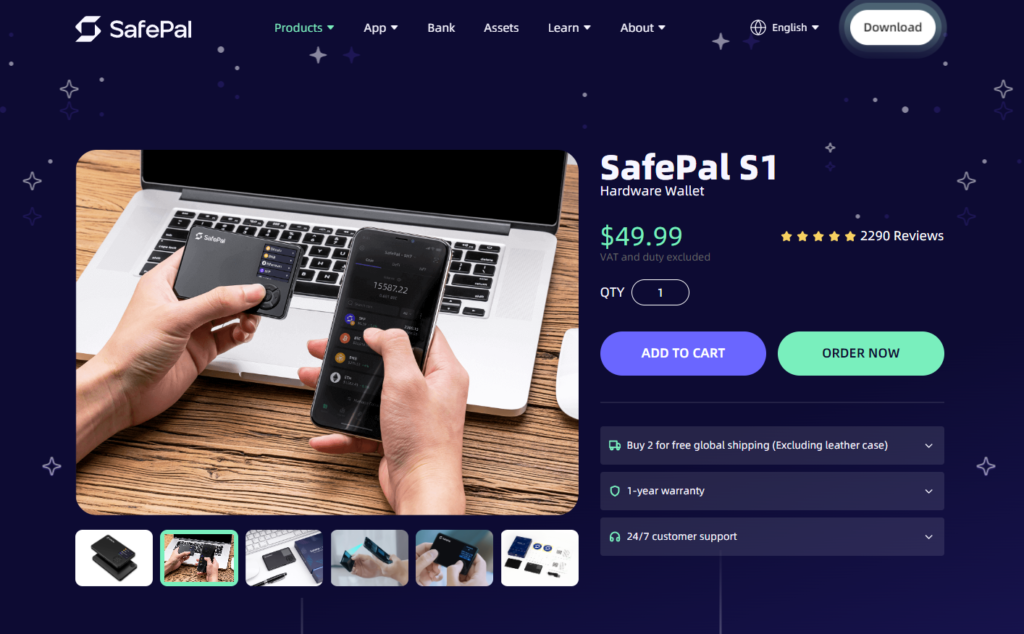
SafePal offers both software and hardware wallet solutions.
Pros:
- Hardware wallet option
- Secure storage
- DeFi and NFT access
Cons:
- Limited fiat support
- Steeper learning curve
9. Exodus

Exodus focuses on ease of use and clean design.
Pros:
- Beginner-friendly
- Multi-platform support
- Portfolio tracking
Cons:
- Limited DeFi tools
- Fiat coverage varies
10. Coinomi

Coinomi emphasizes privacy and multi-asset support.
Pros:
- Strong privacy tools
- Long market history
- Cross-platform access
Cons:
- Basic payment tools
- Limited DeFi features
Buy ENS with Apple Pay
Apple Pay allows users to purchase ENS using an iPhone or iPad without manually entering card details. Payments are confirmed through Face ID or Touch ID, making the process fast and secure.
Many mobile crypto wallets support Apple Pay through integrated payment services. After selecting ENS and choosing Apple Pay, the transaction usually completes within minutes.
This option is ideal for users who prefer quick mobile payments.
Buy ENS with Google Pay
Google Pay offers a simple way to purchase ENS on Android devices. Users confirm the transaction through their Google account, and funds are transferred securely.
Once ENS is selected and Google Pay is chosen, the tokens are sent directly to the wallet address.
Google Pay is popular for its speed and convenience.
How to Buy The Ethereum Name Service (ENS) with Fiat
Here is a general step-by-step process for buying ENS with traditional currency:
- Install a crypto wallet that supports fiat purchases
- Create a wallet and back up your recovery phrase
- Search for ENS in the buy section
- Select your fiat currency such as USD or EUR
- Choose a payment method like card, Apple Pay, or Google Pay
- Enter the purchase amount
- Confirm the transaction
- Receive ENS in your wallet
Most transactions are completed within a few minutes, depending on the payment provider.
Ethereum Name Service (ENS) simplifies how users interact with blockchain addresses by replacing long wallet strings with readable names. It also provides decentralized identity features for Web3 users.
With modern wallets supporting fiat purchases, users can now buy ENS using USD, EUR, and other currencies through mobile apps, cards, and digital payment services.
Data current as of January 2026.
FAQ
Most frequent questions and answers
ENS is used for decentralized identity and naming services on Ethereum. Its value depends on adoption, ecosystem growth, and demand for blockchain-based naming tools.
You can buy ENS with USD using crypto wallets that support card payments, Apple Pay, or Google Pay, like Walletverse. Select ENS, choose USD, and complete the purchase.
Walletverse is a mobile crypto wallet that supports fiat purchases, self-custody security, and access to over 700 cryptocurrencies, including ENS.
ENS can be purchased through crypto wallets with fiat on-ramps or on exchanges that list the token, like Walletverse.
The lowest fees usually come from bank card purchases or local currency payment options. Fees depend on the provider and region. Walletverse also helps reduce USDT transfer costs with its GasFree system.


