


How to Move Crypto from an Exchange to a Wallet
Updated: October 2026
Moving crypto from an exchange to a wallet takes a few minutes. Deciding whether to move it, and how much, takes more thought. This guide covers that part:
- what changes when your crypto leaves an exchange;
- what to keep on the exchange;
- how to pick the cheapest network;
- whether a transfer is taxable;
- why withdrawals sometimes get held.
For a click-by-click walkthrough, see our step-by-step guide to transferring crypto from an exchange to a wallet.
Crypto Exchange vs Wallet: What Changes When You Move
On an exchange, the platform holds the private keys and your balance is an entry in its records. When you withdraw to a self-custody wallet, the coins move on the blockchain to an address whose keys only you hold.
| Keeping crypto on an exchange | Holding it in your own wallet | |
|---|---|---|
| Who holds the keys | The exchange | You |
| If the platform halts withdrawals | Your funds are stuck until it resumes | Not affected |
| If you lose your password or recovery phrase | Account recovery through support | No one can restore access |
| Moving coins inside the platform | Internal transfers, no network fee | Every transfer is an on-chain transaction with a network fee |
| Selling for cash | Usually built in | You send coins to a service that pays out fiat |
Internal transfers vs withdrawals: Webopedia.
Why the platform risk is real. Exchanges and crypto brokers have frozen customer funds before:
- Voyager Digital suspended trading, deposits and withdrawals on July 1, 2022 and filed for bankruptcy five days later (Vermont DFR).
- FTX halted withdrawals in November 2022 and filed for bankruptcy on November 11 (Reuters).
- Bybit said in February 2025 that hackers had stolen tokens worth about $1.5 billion (Reuters).
Why self-custody isn’t risk-free. There’s no “forgot password” button. If you lose your recovery details or send to a wrong address, nobody can reverse it.
Is It Better to Keep Crypto in a Wallet or on an Exchange?
For most people, the answer is both, for different jobs:
- Keep on the exchange only what you’re actively trading or about to sell for cash.
- Move to a self-custody wallet what you plan to hold for weeks or longer, or what you want to use in dApps, staking or swaps.
- Use a hardware wallet for large long-term holdings.
A simple rule: if losing access to the exchange for a month would hurt, that amount belongs in your own wallet.
Moving Crypto in 5 Steps (Short Version)
- In your wallet, open the coin and tap Receive. Note the network shown next to the address.
- On the exchange, open Withdraw, pick the same coin and the same network.
- Paste the address and check the first and last characters.
- Review the fee and the amount you’ll receive, then confirm with 2FA.
- Track the transaction ID (TXID) in a blockchain explorer until it’s confirmed.
For large amounts, send a small test first. Memos and tags, cold wallets and fixing mistakes are covered in the full guide.
Which Crypto Is Cheapest to Transfer?
There’s no fixed ranking. Two costs add up:
- The exchange’s withdrawal fee. Each exchange sets its own fee for every coin and network, shows it on the withdrawal page and can change it.
- The network fee. Network fees depend on how busy the blockchain is and can vary a lot over time (EMCD). On Solana, for example, the base fee is 5,000 lamports (0.000005 SOL) per signature, plus an optional priority fee (Solana docs).
What to do: if the coin you’re moving exists on several networks, as USDT does, compare the fee for each network your wallet supports. Then pick the cheapest one that both sides support. Saving on the fee isn’t worth it if the receiving wallet can’t see that network.
Moving Crypto Between Exchanges or Between Wallets
- From one exchange to another: copy the deposit address from the receiving exchange, plus the memo or tag if it shows one. Withdraw from the sending exchange on the same network.
- From wallet to wallet: tap Send in one wallet and paste the Receive address from the other. You pay only the network fee, so keep some of the network’s native coin, such as ETH on Ethereum or TRX on TRON.
- Between a wallet and an app like PayPal: check which coins and networks the app accepts for deposits before you send.
Do I Pay Taxes If I Transfer Crypto?
- US: moving crypto between wallets or accounts that you own isn’t a taxable event (IRS FAQ, Recap). Swapping one coin for another is taxable: you recognize a capital gain or loss. Keep records of your transfers so you can always show your cost basis.
- UK — the “30-day rule”: HMRC matches crypto you buy within 30 days after selling the same type of token to that sale, instead of to your existing pool. This affects the gain you report (HMRC Cryptoassets Manual). A transfer between your own wallets isn’t a sale, but selling and buying back within 30 days falls under this rule.
Rules differ by country. This isn’t tax advice.
Why Can't I Withdraw or Cash Out My Crypto?
Common reasons an exchange holds a withdrawal:
- Deposit holds. On Coinbase, for example, cash deposits can be placed on hold. Crypto bought with that cash can be traded but not sent off the platform until the hold is lifted, and support can’t shorten it (Coinbase Help).
- Limits and minimums. Withdrawals have daily limits and minimum amounts per coin.
- Network congestion or maintenance. The exchange may pause withdrawals on a busy network or during maintenance.
- Security or compliance checks. New addresses, unusual activity or verification requirements can delay a withdrawal (Webopedia).
If a withdrawal is pending with no TXID, the exchange hasn’t sent it yet, so contact its support. If there’s a TXID, check it in a blockchain explorer.
After the Move: Keep Your Wallet Safe
- Write down your recovery details offline and never share them. No real support agent will ask for them.
- Protect the wallet app with a passcode and biometrics.
- Before you send to a new address, check it for risk and send a small test first.
- Move large long-term holdings to a hardware wallet.
Receiving Crypto in Walletverse
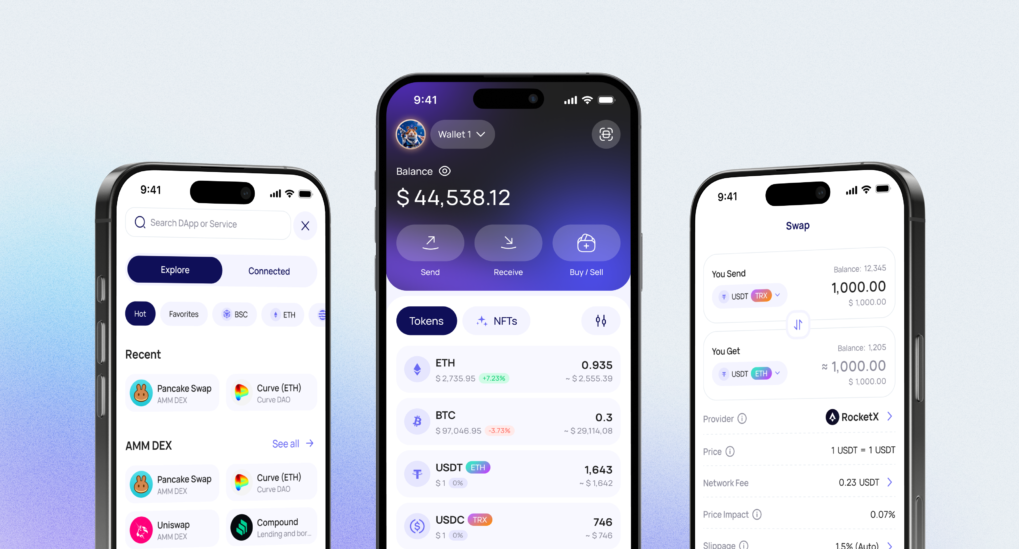
Walletverse is a free self-custody wallet for iOS and Android. It supports 700+ cryptocurrencies and tokens across multiple networks:
- private keys are encrypted on your device, and the Walletverse team has no access to them;
- passcode and biometric protection;
- built-in AML checks, powered by Crystal, show an address’s risk level before you send;
- swaps through a DEX and CEX aggregator, plus staking for ETH, SOL, TRX and other assets.
To receive crypto from an exchange, open the coin in Walletverse and tap Receive. Check the network, then use that address in the exchange’s Withdraw form. Selling crypto for fiat isn’t available in Walletverse yet, so keep the amount you plan to cash out on the exchange.


FAQ
Most frequent questions and answers
Exchanges are vulnerable to hacks and other risks. Moving your crypto to a personal wallet gives you control and enhances security.
Transfer times vary depending on the blockchain network but typically range from a few minutes to an hour.
Crypto transactions are irreversible. Always double-check the wallet address before confirming a transfer.
No, ensure the wallet supports the specific cryptocurrency and network you are transferring to avoid loss of funds.


