


How to Check Your Crypto Wallet Balance: A Simple Guide
- Updated: 2026-01-28
Checking your crypto wallet balance is one of the simplest habits that helps you stay in control of your assets.
In 2026, it’s also more important because most users hold more than one asset and often use multiple networks (Bitcoin, Ethereum, TRON, Solana, etc.). Crypto.com’s market sizing research highlights how fast overall adoption has grown, which typically correlates with more multi-asset wallets and more on-chain activity.
What you need before you start
Your wallet address (public address).
The correct network (example: USDT on Ethereum vs USDT on TRON are different networks).
If you’re checking a token, sometimes you also need the token contract address (for manual checks).
Important: you never need to share your seed phrase or private key to check a balance.
Method 1: Check your balance in a wallet app (fastest option)
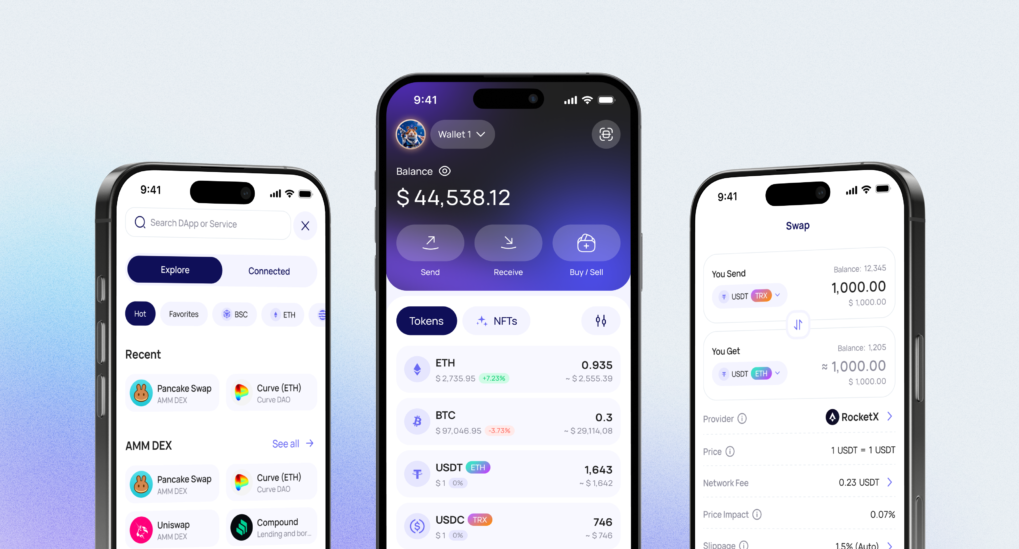
If you already use a mobile wallet, the balance is usually shown instantly on the main screen, with a breakdown by asset.
Example: Walletverse (in-app balance check)
Walletverse is a mobile crypto wallet, multi-currency, Web3, DeFi. Free. Supports 700+ cryptocurrencies, dApps and multi-account.
Self-custody (you control keys).
How to check balance in Walletverse:
Open the app.
Go to your portfolio (main screen).
Tap an asset to see token balance and transaction history.
Download Walletverse


Method 2: Check your balance using a blockchain explorer (no login needed)
A blockchain explorer is a public website that shows on-chain data for an address: balance, transactions, and confirmations. Ethereum.org lists block explorers as a standard way to view on-chain data.
Bitcoin balance check
Use a Bitcoin explorer.
Blockchain.com provides a dedicated Explorer section where you can search on-chain data.
Steps:
Copy your BTC address from your wallet.
Paste it into the explorer search bar.
Review balance and recent transactions.
Ethereum and tokens (ERC-20)
Use an Ethereum explorer (for ETH + token balances).
Steps:
Copy your Ethereum address.
Paste it into the explorer.
Check ETH balance.
Scroll to token holdings (ERC-20) to see token balances.
Multi-chain “one place to check” explorers
Some explorers support multiple networks and can be convenient if you’re tracking several chains. Blockchair positions itself as a blockchain search/explorer across networks.
Method 3: Check balance on an exchange or custodial platform
If your funds are on an exchange (custodial wallet), your balance is shown inside your exchange account.
What to do:
Open the exchange app/site.
Go to “Wallet” or “Assets.”
Check “Available” vs “In orders” vs “Locked” balances (wording depends on the platform).
Tip: exchange balances are not “on-chain address balances” you can verify with your own wallet address unless you withdraw to your personal address.
How to check token balance correctly (common mistake in 2026)
If a token “doesn’t show,” it’s usually one of these:
Wrong network (most common).
Token not added/visible in the wallet UI.
You copied the wrong address (different account).
Transaction is pending or not confirmed yet.
Quick fix checklist:
Verify the network first.
Check the address in an explorer for that same network.
If it’s a token, confirm you’re looking at token holdings (not just the native coin).
Why checking your wallet balance matters
- It helps you confirm that funds arrived.
- It helps you spot unexpected transactions early.
- It helps you track long-term holdings and short-term transfers without guessing.
Security tips when checking balances
Never share your seed phrase or private key.
Use official apps and double-check domains before pasting addresses.
If using a public Wi-Fi network, avoid logging into exchanges.
Keep your phone OS and wallet app updated.
If you see an unknown outgoing transaction, act immediately (move remaining funds to a new wallet).
FAQ
Most frequent questions and answers
You can check your balance in two main ways.
Open your wallet app and view your portfolio.
Paste your public wallet address into a blockchain explorer for that network.
If you use Walletverse, you can view balances for 700+ cryptocurrencies directly in the app.
Open Walletverse → go to your portfolio → tap an asset to see the balance and transaction history.
For Ethereum, you can:
Use an Ethereum blockchain explorer by pasting your ETH address and reviewing ETH + token holdings.
Check inside your wallet app.
In Walletverse, select Ethereum from your asset list to see your ETH balance, token holdings, and recent transactions in one place.
Use a self-custody wallet and strong device security habits.
A safe approach looks like this:
Check balances inside a trusted wallet app.
Use explorers only for “read-only” verification (never share seed phrases or private keys).
Enable passcode + biometrics, keep your OS updated, and store your recovery phrase offline.
Walletverse supports self-custody and includes passcode and biometric authentication for day-to-day monitoring.
No.
Most wallet apps show balances instantly, and blockchain explorers let you verify balances with just a public address (no login).
Walletverse also provides a real-time balance view inside the app across 700+ supported assets, which is convenient if you track multiple coins and networks.
Yes. Public explorers let you view address balances without logging in.
Often it’s pending confirmations, a wrong network selection, or the wallet hasn’t refreshed yet.


