


Best Solana Staking Wallets for Beginners in 2026: 5 Easy & Secure Options
Last updated: October 2026
Choosing a Solana staking wallet can be confusing when you’re new to crypto. Some wallets focus on simplicity, others give you more control over validators, and hardware wallets put private-key security ahead of convenience.
For most beginners, the best option is a self-custody wallet with a simple staking interface, clear security controls, transparent staking information and an easy way to unstake SOL when needed.
Quick Answer: Best Solana Staking Wallets for Beginners
- Walletverse — best for mobile-first beginners and multi-chain users
- Phantom — best familiar all-around Solana wallet
- Solflare — best for native SOL staking and validator control
- Trust Wallet — best multi-chain alternative
- Ledger — best for hardware-backed security and long-term holders
- Tangem — best card-style hardware wallet with in-app staking
There’s no single best wallet for every SOL holder. A beginner staking a small amount from a phone may value simplicity, while someone with a larger balance may prefer a hardware wallet and more validator control.
Solana Staking Wallet Comparison 2026
| Wallet | Best for | Self-custody | Platforms | Staking options | Main limitation |
|---|---|---|---|---|---|
| Walletverse | Mobile-first beginners | Yes | iOS, Android | SOL staking in the app | Mobile only |
| Phantom | Everyday Solana users | Yes | Mobile, browser extension | Native and liquid staking (Phantom) | Liquid staking adds smart-contract risk |
| Solflare | Validator control | Yes | Mobile, browser extension | Native staking, works with Ledger (Ledger) | More Solana-focused |
| Trust Wallet | Multi-chain beginners | Yes | Mobile, browser extension | SOL staking via validators (Trust Wallet) | Less Solana-specialized |
| Ledger | Long-term holders | Yes | Hardware + companion apps | Stake through Solflare or other compatible apps | Requires buying a device |
| Tangem | Card-style cold storage | Yes | NFC card + Tangem app | Stake SOL in the Tangem app (Tangem) | Needs an NFC phone; no screen on the card |
Solana Staking in Numbers (October 2026)
| Metric | Value |
|---|---|
| Share of SOL supply staked | 69% at the end of Q3 2026 (Bitwise via Solana Compass) |
| Gross staking yield | 5.99% in Q3 2026, down from 6.38% (Bitwise via Solana Compass) |
| Live reward rate | 4.90% APY on Staking Rewards when checked (Staking Rewards) |
| Epoch length | 432,000 slots; with 200 ms slots since 9 October 2026, about 24 hours (Solana) |
Rates change every epoch and differ by validator, commission and method — they’re not a guaranteed return.
How We Chose the Best SOL Staking Wallets
A wallet shouldn’t rank highly just because it offers staking. For beginners, the whole experience matters:
- Ease of use — create a wallet, receive SOL, find staking, review and monitor the position without a confusing interface.
- Self-custody — you control the wallet rather than leaving SOL with an exchange. That also means responsibility: losing or exposing your recovery phrase can mean permanent loss.
- SOL staking support — staking without jumping between unrelated services.
- Validator information — native staking delegates SOL to a validator; good interfaces show performance and commission.
- Security — device protection, passcode or biometrics, hardware-wallet compatibility and transaction review.
- Unstaking experience — native staking and unstaking aren’t instant; the wallet should make stake status clear.
- Fee and reward transparency — a high displayed APY doesn’t automatically mean better returns.
1. Walletverse — Best for Mobile-First Beginners

Best for: beginners who want to stake SOL from a mobile self-custody wallet while managing other crypto in the same app.
Walletverse is a self-custody mobile wallet for iOS and Android that supports Solana alongside 700+ cryptocurrencies and tokens, with swaps, Web3 access and staking in one app.
Why it’s beginner-friendly:
- Self-custody: private keys are encrypted on your device
- SOL staking (as well as ETH, TRX and other assets)
- Passcode and biometric protection
- Built-in swaps through an aggregator of 100+ DEX and CEX venues
- WalletConnect for Solana dApps
- AML/KYT checks (powered by Crystal) to see an address’s risk before you send
About staking rewards: don’t choose a wallet by a fixed APY number. Solana rewards change with network conditions and validator performance, so check the estimated rate shown in Walletverse when you stake rather than treating it as a guaranteed return.
Verdict: a strong choice for a beginner who wants easy mobile staking, self-custody and SOL alongside a broader portfolio.


2. Phantom — Best Familiar All-Around Solana Wallet

Best for: beginners who plan to use Solana dApps, NFTs and swaps from a widely used wallet.
Phantom started as a Solana wallet and has expanded to other networks, including Ethereum and Bitcoin (Phantom). It offers two ways to stake SOL: native staking, where you delegate directly to a validator, and liquid staking, which keeps your stake usable while it earns rewards (Phantom). Note that Phantom charges a 0.85% fee on most swaps (Phantom).
3. Solflare — Best for Native SOL Staking

Best for: users who want more control over validator selection.
Solflare is built around Solana and is available as a browser extension and mobile app for trading, staking and holding crypto (Solflare). You can also connect a Ledger Solana account to Solflare and stake from it (Ledger), which makes it a popular interface for hardware-wallet staking.
4. Trust Wallet — Best Multi-Chain Alternative

Best for: beginners who want SOL staking inside a broadly supported multi-chain wallet.
Trust Wallet is a self-custody wallet for many networks; SOL can be staked by delegating to an available validator (Trust Wallet). Its main attraction is convenience: you manage SOL alongside many other assets in one app.
5. Ledger — Best for Hardware-Backed SOL Stakin

Best for: long-term SOL holders and larger balances.
Ledger keeps private keys on a dedicated device with a secure element. You can stake SOL while every transaction is approved on the device — for example, by connecting your Ledger Solana account to Solflare (Ledger).
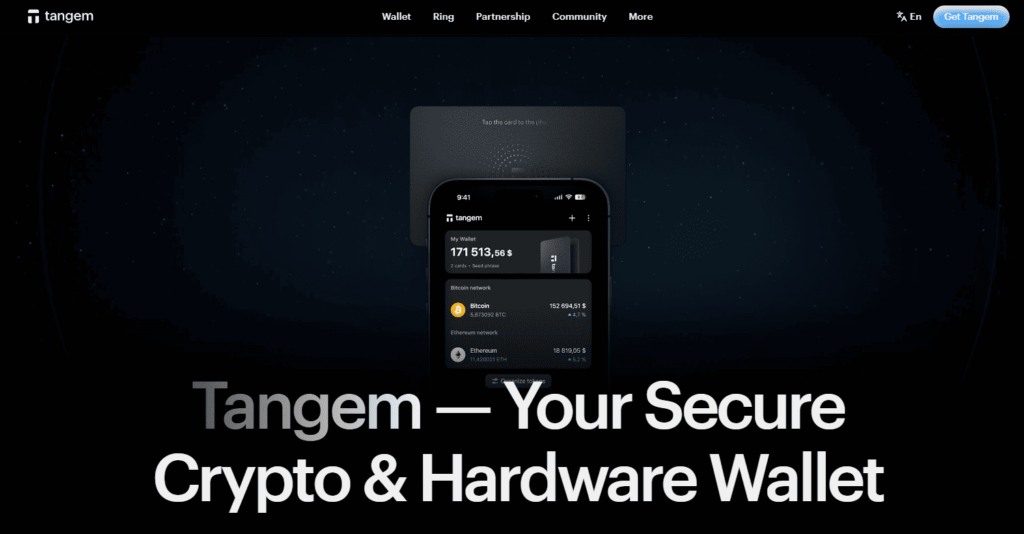
6. Tangem — Best Card-Style Hardware Wallet
Best for: beginners who want cold storage that’s easy to carry.
Tangem is a hardware wallet in the form of an NFC card with an EAL6+ certified chip (Tangem). You stake SOL in the Tangem app: select SOL, tap Stake, review the details and confirm with the card (Tangem). It needs an NFC-enabled phone, and the card has no screen of its own.
How to Stake SOL in a Wallet: Step by Step
- Install a self-custody wallet and back up your recovery details offline.
- Add SOL — buy it in the wallet or transfer it from an exchange to your Solana address.
- Leave a little SOL unstaked to pay network fees.
- Open Stake, choose native or liquid staking, and pick a validator (or accept the wallet’s default).
- Review and confirm. Native stake activates at the start of the next epoch, and rewards are calculated per epoch.
- To unstake, deactivate the stake; it becomes withdrawable after the epoch boundary, then withdraw it to your main balance.
How Does Solana Staking Work?
Solana uses proof of stake. SOL holders delegate tokens to validators that take part in consensus. Delegating SOL doesn’t give the validator ownership of your tokens: with native staking, your stake stays in a stake account controlled by your wallet (Solana Docs).
The reward rate is variable and depends on:
- Solana’s network inflation;
- the amount of SOL staked across the network;
- validator performance and uptime;
- validator commission;
- network and protocol conditions.
That’s why a wallet shouldn’t advertise staking rewards as a fixed return.
Native vs liquid staking
| Native staking | Liquid staking | |
|---|---|---|
| How it works | Delegate SOL directly to a validator | Receive a token that represents your staked SOL |
| Can you use the stake? | No, while it’s active | Yes — the token can be swapped or used in DeFi |
| Unstaking | Takes effect at epoch boundaries | Swap the token back, or unstake through the protocol |
| Extra risk | Validator performance | Smart-contract and token-price risk |
Swapping SOL and Staked SOL
Staking and swapping often go together: you might swap USDT or another coin into SOL before staking, or swap a liquid-staking token back to SOL. In Walletverse, open the coin you hold, tap Swap, choose SOL and check the quote — the aggregator compares routes across 100+ DEX and CEX venues. Always compare the final amount you’ll receive and keep some SOL for fees. Step-by-step guide: how to swap USDC to SOL.
Supported Coins: SOL and SPL Tokens
Tokens on Solana use the SPL standard — USDC, USDT and thousands of other tokens run on it. When you choose a staking wallet, check that it:
- shows SPL tokens, not just SOL;
- supports the other networks you use, if you hold BTC, ETH or TRON assets too — multi-chain wallets such as Walletverse and Trust Wallet keep them in one app;
- uses the right network when you withdraw from an exchange: USDC on Solana and USDC on Ethereum are different.
Is Solana Staking Safe?
Staking SOL is fairly straightforward, but it isn’t risk-free:
- Wallet security risk — anyone with your recovery phrase can control your wallet. Never give it to a website, support agent, social-media account or dApp.
- Validator risk — poor validator performance can reduce your rewards.
- Unstaking delay — native stake isn’t immediately spendable while activating or deactivating.
- Market risk — even as your SOL balance grows, SOL’s price can fall.
- Smart-contract risk — mainly with liquid staking or DeFi protocols.
- Custodial risk — staking on an exchange means relying on that company.
Keeping Your Solana Wallet Secure
- Store your recovery phrase offline and never type it into a website.
- Download wallets only from official stores — fake Solana wallet apps and browser extensions exist.
- Ignore unsolicited tokens and “airdrop claim” links — they’re a common way to trick users into signing malicious transactions.
- Read what you sign in dApps, and revoke permissions you don’t need.
- Use a hardware wallet (Ledger, Tangem) for larger balances.
- Check addresses before sending. Walletverse’s AML checks show an address’s risk level.
Which Solana Staking Wallet Should a Beginner Choose?
- Walletverse — a simple mobile self-custody wallet with SOL staking and multi-chain assets in one app.
- Phantom — a familiar wallet for staking, Solana apps, NFTs and swaps, with native and liquid staking.
- Solflare — if native staking and validator management are your priority.
- Trust Wallet — if you already manage many networks.
- Ledger or Tangem — if protecting a larger long-term balance matters more than convenience.
For many first-time users, the simplest path is a self-custody software wallet and a small amount of SOL, adding hardware protection later as the balance grows.
FAQ
Most frequent questions and answers
Walletverse is a strong Solana wallet for mobile-first multi-chain beginners.
Yes. Several self-custody wallets allow SOL holders to delegate stake to Solana validators while maintaining control of their wallet credentials and stake account.
Solana staking rewards are calculated by epoch. An epoch lasts approximately two days, although timing and the start of rewards for newly delegated stake can vary.
Yes. Staking is not risk-free. SOL’s market value can fall, wallet credentials can be compromised, validator performance may affect rewards, and liquid or custodial staking introduces additional protocol or counterparty risks.
With native Solana delegation, delegating stake does not transfer ownership of your SOL to the validator. You retain control of the stake through your stake account.


